Liquid Glass Widgets Blur v1.1 MOD APK (Full Version)
File Information

| Updated | 2026-10-20 |
|---|---|
| Version | v1.1 |
| Size | 50.3 MB |
| Mod | Full Version |
| Requires | Android 12 |
| Developer | AppsLab Co. |
| Category | Tools |
| Package name | com.appslab.liquidglass.widgets |
| Paid | 1.29 EUR on Google Play |
| Google Play | View on Google Play |
- Full Version
Screenshots


Description
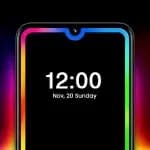
Liquid Glass Widgets Blur Mod APK is a widget app that lets you customize your Android home and lock screens with liquid glass effects. You can choose from more than 500 widgets, adjust their blur and appearance, and pair them with matching wallpapers.
Liquid glass widget customization
Widgets use a liquid glass finish with adjustable real blur rather than a fixed frosted effect. You can control blur strength, colors, tint, transparency, and widget style to match a wallpaper or a particular home-screen layout.
You do not need KWGT, a third-party launcher, or another companion app. Install Liquid Glass Widgets Blur Mod APK, customize a widget, then add it to your screen.
Widget collection
The collection covers both practical information and shortcut-based widgets for your home or lock screen.
- Clock, weather, calendar, battery, step counter, compass, screen time, device information, and world clock widgets show changing phone or daily information.
- Quotes, facts, photos, notes, lists, watch, games, and AI shortcut widgets add different content or entry points to your layout.
- Music, earbuds control, quick settings, search, Google shortcuts, contacts, apps, and custom apps widgets provide access to phone functions and connected content.
Wallpapers and updates
Liquid Glass Widgets Blur Mod APK includes more than 600 wallpapers designed to complete a glass-effect setup. Its widgets use efficient updates, and the app receives regular widget additions and improvements.
Permissions for selected widgets
Permissions are requested when you choose a widget that needs them. Accessibility locates this app's widgets on your home screen and keeps the glass behind them synchronized, while notification access lets music widgets show what is playing.
Usage access supports Screen Time widgets. Health Connect and physical activity access support health widgets, and location is used by weather and world clock widgets when you select Use my location.
Contact and calendar access support their matching widgets. Bluetooth shows the battery of connected earbuds, camera access reads only the torch state, and foreground service with exact alarms keeps widgets updating on time.
About this MOD
MOD: Full Version.
What’s New
v1.1- Bug Fixes and Performance Improvements
The developer's own release notes, taken from Google Play.View on Google PlayRetrieved 2026-10-21
Verified package facts
Every value above comes from the installable file and is matched with the app's Google Play listing. TechBigs does not run antivirus scans or test-install builds on a phone.
Data Safety
Liquid Glass Widgets Blur’s developer publishes this on Google Play — what the official app collects and what it shares. We reproduce it here so you can read it before installing.
- Data is encrypted in transitYour data is transferred over a secure connection
View on Google PlayRetrieved 2026-10-21
Specifications
Version
v1.1
Latest
Size
50.3 MB
Total
Category
tools
Developer
AppsLab Co.
Views
437
Updated
2026-10-20
Mod Review
This build suits people who want to tune blur strength, tint, and transparency across a home-screen widget layout. It also fits users who want clock, weather, calendar, music, or note widgets without installing KWGT or another launcher. Skip it if your device cannot install Android 12, or if the recent bug-fix and performance update is important to you.
The MOD in practice
Compared with the Google Play version, this build is labeled Full Version. The label identifies the MOD but does not define a separate list of changed features. Liquid glass customization, home and lock screen widgets, and wallpaper selection remain the app's main use. The current listed version is 1.1.
What works
- Adjustable blur, color, tint, transparency, and style controls let you match widgets to a chosen wallpaper.
- Home and lock screen support lets you carry the liquid glass look across both Android surfaces.
- More than 500 widgets cover information, shortcuts, music, contacts, notes, and connected earbuds in one collection.
What to watch
- Music, Screen Time, health, weather, contacts, and calendar widgets request access when you select their related features.
- The 50.3 MB package requires Android 12 as the minimum version for installation.
Our take
Install it when the Full Version label and its broad widget selection match the setup you want. Check that your phone runs Android 12 before downloading, then decide which optional widget permissions you want to allow.
FAQ
What is Liquid Glass Widgets Blur used for?
Liquid Glass Widgets Blur customizes Android home and lock screens with liquid glass widgets and adjustable blur. Its collection includes clocks, weather, calendars, battery displays, music controls, notes, contacts, shortcuts, and other widget types. You can also use its wallpapers to match the widget layout.
What does the Full Version MOD change?
This build is labeled Full Version. The app remains focused on liquid glass widget customization for Android screens.
Which permissions do its widgets use?
Permissions depend on the widget you choose. Music widgets use notification access, Screen Time widgets use usage access, and health widgets use Health Connect and physical activity access. Weather and world clock can use location when you select Use my location, while contact, calendar, Bluetooth, camera, alarms, and accessibility access support their related widget functions.
What is new in version 1.1?
Version 1.1 includes bug fixes and performance improvements. The app also states that regular updates add new widgets and improvements. Whether future changes are available depends on the developer's releases.
What Android version is needed to install Liquid Glass Widgets Blur?
Liquid Glass Widgets Blur requires Android 12 as the minimum version to install. The listed file size is 50.3 MB. Android may show a prompt asking whether to allow installation from this source, and that choice remains yours.